
Product images
Cable rendering: product images from your data.
A cable rendering is a product image calculated from the 3D model of your cable: no sample, no photo studio, and the same look across your whole lineup.
Who it's forFor marketing, product management, and sales at a cable manufacturer.
In short
- Product images from the 3D model, not photographed
- Fixed looks and views for every cable
- PNG, JPG, or WebP for web, print, and large format
- Your team orders on its own, with the price shown up front

FileCable, shot, pixel sizePNG, JPG, or WebP
What is a cable rendering?
What it is
A cable rendering is a product image that a computer calculates from the 3D model of your cable.
Nobody photographs a sample for it. The model is built from your construction data, and every image is rendered from the model. You order each image yourself by making four choices.
Under every image lies a model made of many small triangles. The figure shows the same cable as a finished image, as a clay model, and as a wireframe.
The same data cable in one image, in three bands: first fully rendered with an orange jacket and print, then as a gray clay model, last as a wireframe of triangles. Switches show each stage alone and the braid up close.

On the left the finished image, in the middle the clay model, on the right the wireframe. One camera, one model.

The rendering: material, light and print on the model.

The same model without material: only the shape, layer by layer.

The triangles the model is made of. Where they get too small in the image, the wireframe leaves them out.

The braid is real geometry too, wire by wire.
Key terms
- 3D model
- The cable as a solid object in the computer, built layer by layer from your construction data. Every image is made from it.
- Look
- The lighting and materials of an image, such as catalog image, photo look, product photo, or daylight. There are 5 looks.
- Shot
- A look together with a view, such as “Photo look (cable end).” The view is the camera angle.
- Surface
- What the cable rests on in the image. You choose from 8 surfaces, such as grass, snow, concrete, or wood.
- Credits
- The unit you use to pay for images. You see an image's price before you order.
How does my data become an image?
How it works
We build the 3D model once, and from then on your team orders each image itself in the portal.
The first two steps happen once per cable. You repeat the other four for each additional image.
The process as six stations on one line: you send the construction data, we build the 3D model. You choose shot and size, the portal shows preview and price, you order, the portal renders the image.
YouWeThe portal
YouSend the data
WeBuild the 3D model
YouChoose shot and size
The portalShow preview and price
YouOrder the image
The portalRender and save
Step by step
- Step 1 of 6: You
Send the data
You upload the cable's datasheet in the portal, as a PDF, an image, or an Excel file. You don't send a sample.
- Step 2 of 6: We
Build the 3D model
We build the model from the data: conductor, insulation, shield, jacket, and print. You review it and accept it.
- Step 3 of 6: You
Choose shot and size
You choose the shot, the background, the image size, and the file format. The portal offers only what this cable's construction allows.
- Step 4 of 6: The portal
Show preview and price
A small preview shows this exact cable in the shot you chose and costs nothing. The price in credits is shown next to it.
- Step 5 of 6: You
Order the image
Placing the order reserves the credits. You are never charged a price you haven't seen.
- Step 6 of 6: The portal
Render and save
The portal renders the image and saves it to the media library, where all your files are kept. If the rendering fails, the credits are released.
What happens behind the scenes
Data, model, and image are linked. When the model or the print changes, the portal marks the affected images as outdated.
From datasheet to image
- The construction data: conductors, shield, jacket, dimensions.
- It becomes a dimensionally accurate 3D model.
- The image is rendered from the model, like a photograph.
- When the data changes, the images are re-rendered the same way.
More on this Order an image yourself in the demo portal →
What do I get in the end?
What you get
You get an image file that shows your cable exactly as your data describes it.
A new image starts out internal. You approve it for the public catalog with one click.

4FileCable, shot, pixel sizePNG, JPG, or WebP
The same shot, other cables
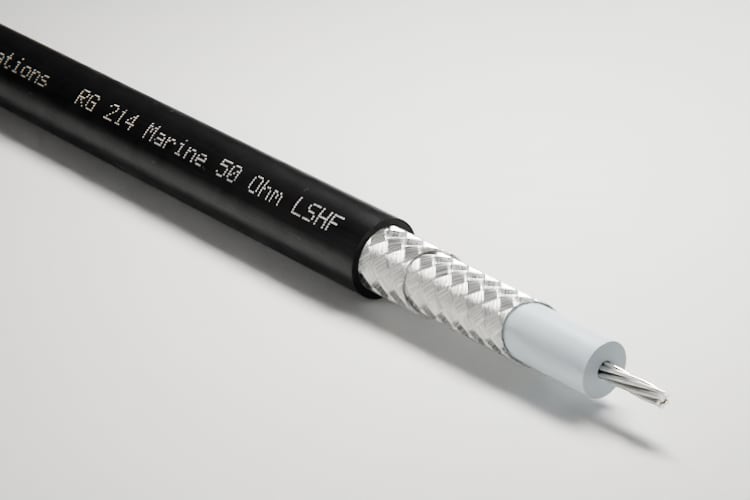
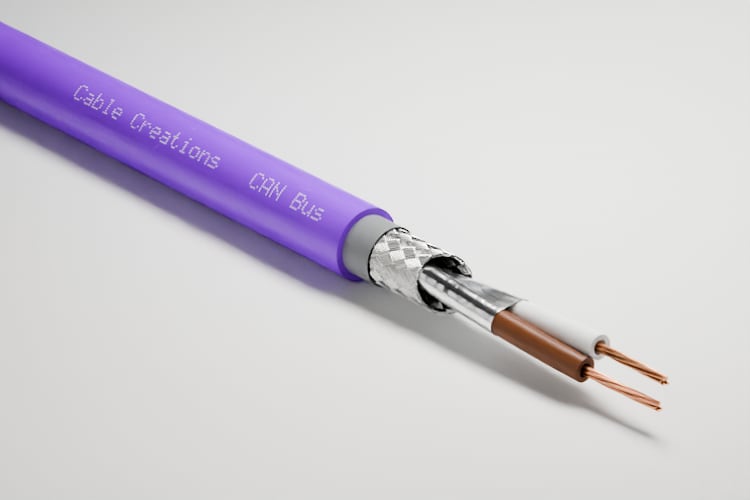
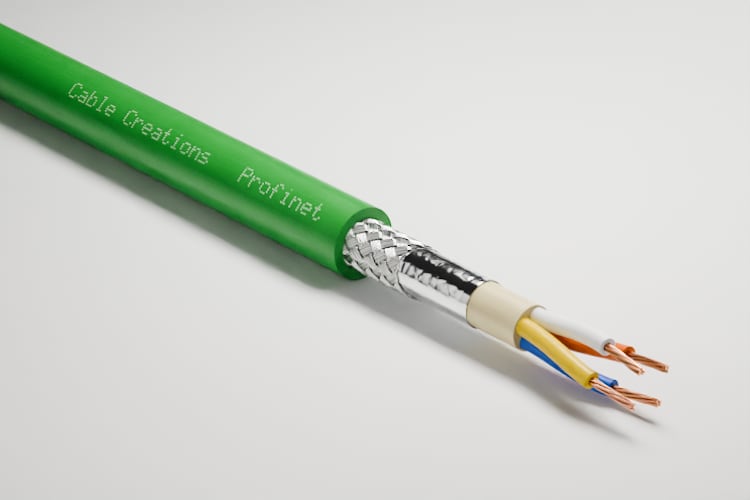


What the numbers show
The print
The print on the jacket is part of the model and is rendered dot by dot.
The construction
Every layer is where your data puts it: braid, foil, insulation, and conductors.
Light and background
Each look has fixed lighting. You choose the background: transparent, a color, or a surface.
The file
PNG, JPG, or WebP in 3 image sizes: web, print, and large format. The file name gives the cable, shot, and pixel size.
The same shot for every cable
Every cable is shown in the same light and at the same angle. That makes your lineup look consistent.
Which look do I use for what?
The looks compared
The catalog image is plain and uniform, the photo look shows the cable as in a studio, and daylight shows it where it's used.
One more look is related to the catalog image: the cutout. Macros belong to the photo look; they show one part of the cable up close.
The fifth look is the product photo: the cable in a dark studio, on charcoal paper, lit by focused light. In the portal, this background is called “Dark studio.”
Three steps on a scale from plain to staged: the catalog image shows the cable straight from the side, the photo look shows it at an angle in the studio with a shadow, and daylight shows it outdoors on a surface in the sun.
PlainStaged
Catalog image
Best forTables, lists, and datasheets
Photo look
Best forCatalog, website, and brochure
Daylight
Best forIn-use images and campaigns
| Aspect | Catalog image | Photo look | Daylight |
|---|---|---|---|
| What it shows | The whole cable, straight from the side | The stripped end, as in a photo studio | The cable outdoors on a surface |
| Best for | Tables, lists, and datasheets | Catalog, website, and brochure | In-use images and campaigns |
| Background | Transparent or a color | A color or a surface | Always a surface |
| Views | Side view | Perspective, detail, cable end, print, and macros | Perspective, or embedded in the surface |
| Cost | The least expensive shots | More than a catalog image | Same as the photo look, plus the surface surcharge |
What do I gain, and where are the limits?
Advantages and limits
Renderings are exact, consistent, and repeatable, but they show only what is in the model.
Advantages
No sample, no studio
The image is made from the data. The cable doesn't have to be manufactured first.
A consistent lineup
Looks and views are fixed. Every cable is shown in the same light and at the same angle.
An accurate construction
What you see in the image is what your construction data says.
Price before you order
The price updates with every choice, and the preview costs nothing.
Repeatable
The same order produces the same image. You reorder outdated images in a single order.
Your team orders on its own
A new image takes no agency and no creative brief.
Limits
Fixed shots, no free camera
You choose from fixed looks and views. You can't set your own camera angle or build your own scene.
The cable only
Connectors, cable assemblies, and reels can't be ordered.
No photo of your site
The surfaces are a fixed list. Your plant or job site can't appear in the image.
Fixed aspect ratio
Every view has its own aspect ratio. If you need a different crop, you make it yourself.
Re-rendering costs credits
The portal marks outdated images. Nothing is rendered again until you order it.
The model comes first
Without a 3D model, there is no image. The model needs the cable's construction data.
Not the right tool if:
- You need an image of production, a drum, or a cable with a connector.
- You need a custom scene with its own camera, for an ad, for example.
- There is no construction data for the cable.
How is this different from a photo shoot or an AI image?
Compared with today
A photo needs a sample, an AI image guesses the construction, and a rendering calculates it from your data.
Photos are still the right choice for production, people, and assembled products. For the cable itself, the rendering replaces the shoot.
Three ways to get an image. The photo: a sample, a camera, a single image. The AI image: a line of text and an image whose inside is guessed. The rendering: a datasheet, a 3D model, and three images made from it.
Photo shoot
What you needA manufactured sample and a studio
AI image
What you needA text description
Rendering from data
What you needThe cable's construction data
| Aspect | Photo shoot | AI image | Rendering from data |
|---|---|---|---|
| What you need | A manufactured sample and a studio | A text description | The cable's construction data |
| When the cable changes | New sample, new photo | Start over | Re-render the affected images in one order |
| One more image | A new shoot | A new attempt with a different result | An order in the portal |
| Consistent across the lineup | Only if everything is shot in one session | Every image turns out differently | Fixed looks and views for all cables |
| Is the construction right? | Yes, it's the real cable | Not reliably; layers and conductors are guessed | Yes, layer by layer from the data |
| What it does not show | Cables not yet manufactured | The exact print and dimensions | Connectors, people, and your site |
What do I need, and what does it cost?
What you need and what it costs
You need your cables' construction data, and you pay for each image in credits.
What you need
Construction data per cable
Your existing datasheet is the easiest source. We build the 3D model from it, once per cable.
Access to the portal
Your team orders there, sees the status of every order, and finds the finished images.
Your print, if you want one
You set the font and marks such as CE once for all cables.
No sample, no software
You don't send a cable or install anything.
What it costs
Every image costs credits. The price depends on the shot and the image size, and a surface adds a surcharge. The file format does not change the price, and the preview is free.
What else do people ask?
Frequently asked questions
Short answers to the questions people still have before the first image.
- What do you need from us to render a cable?
- The cable's construction data, ideally as a datasheet. We build the 3D model from it, so you don't need a sample.
- What sizes and formats do the images come in?
- They come in three image sizes for web, print, and large format, as PNG, JPG, or WebP. A transparent background is available only as PNG.
- Are these AI images?
- No. Every image is rendered from the cable's 3D model; the same order produces the same image every time.
- Can I see an image before I order it?
- Yes. A small preview shows this exact cable in the shot you chose. It costs nothing.
- What happens if a rendering fails?
- The reserved credits are released. You pay only for images that were delivered.
- Can you render connectors or cable assemblies too?
- No. You can order only the cable itself, in fixed poses: straight, in an arc, or with a stripped end.