
Comparison
AI images? Rendered, not generated.
AI generates an image that looks like a cable, while a rendering from the construction data shows the cable you ship.
Who it's forFor marketing, product management, and sales at a cable manufacturer.
In short
- Where each image gets what it shows
- What you can count in a rendering
- Both images, criterion by criterion
- When an AI image is the better choice

Rendered, not generatedEvery layer matches the cable's data.
What is the difference between an AI image and a rendering?
Generated or rendered
An AI image is created from a text description, and a rendering from your cable's construction data.
Both images can look good. The difference is not the style but the source. The source determines whether an image shows your cable or something that looks like a cable.
Key terms
- AI image
- An image that an image generator creates from a text description. The description is called a prompt.
- Construction data
- The specifications your cable is built from: conductor, insulation, shield, jacket, diameters, colors, and print. They are usually in the datasheet.
- 3D model
- Your cable as a dimensionally accurate model in the computer, built from the construction data. Each layer exists in it as a separate part.
- Rendering
- An image calculated from the 3D model, with light, shadow, and materials. Nothing is made up or added.
- Cross-section drawing
- A drawing of the cable in cross-section. It is made from the same data as the rendering.
Where does each image get what it shows?
Where the image comes from
An AI image follows words, learned images, and chance, while a rendering follows only the model of your cable.
An image generator has learned from many images what things look like. From your description, it creates an image that matches. It does not know your datasheet.
With a rendering, there is a model between the data and the image. The steps show how that becomes an image you can verify.
Two paths. Generated: a text description, an image generator, and an image that looks like a cable, determined by words, learned images, and chance. Rendered: construction data, a 3D model, and an image of exactly this cable, determined by data, the model, and the chosen look.
Generated
A descriptionOne sentence says what to show.
An image generatorIt has learned from many images what cables look like.
An image that matchesIt looks like a cable. Nobody specifies which one.
What decides the imageyour wordslearned imageschance
Rendered
The construction dataEvery value is set: conductors, shield, jacket, print.
The 3D modelYour cable, rebuilt to scale and accepted by you.
An image of this cableLight and materials are calculated. Nothing is added.
What decides the imageyour datathe modelthe chosen look
Step by step
- Step 1 of 5: You
Set the data
You upload the datasheet. That settles the conductor count, layers, colors, and print before any image is made.
- Step 2 of 5: Cable Creations
Build the model from data
We rebuild the cable as a 3D model, value by value. If a value is missing, we ask instead of guessing.
- Step 3 of 5: You
Accept the model
You check the model in an image and mark anything that is wrong. The cable is approved only once you accept the model.
- Step 4 of 5: Cable Creations
Calculate the image
The portal calculates the image you ordered from the model. Lighting and materials come from a fixed look.
- Step 5 of 5: You
Check image against data
You count the conductors, read the print, and hold the image next to the datasheet. They have to match.
More on this How construction data becomes an image →
How can I tell that the image shows my cable?
What you can check in a rendering
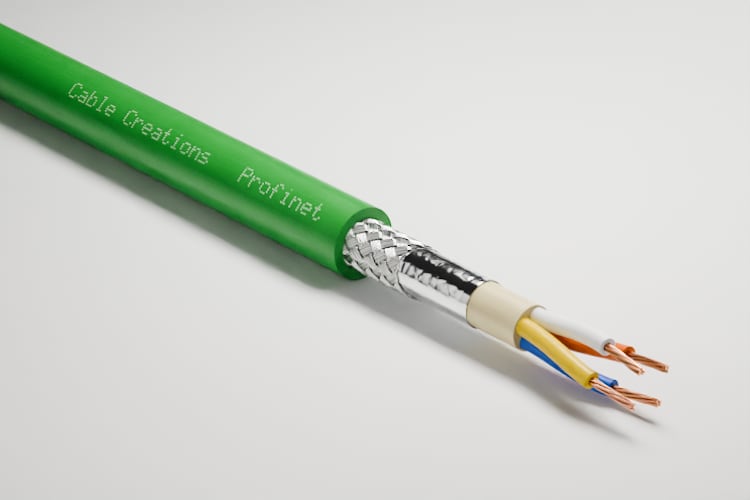
In a rendering, you can check every detail against the datasheet: print, shield, number of insulated conductors, colors, and conductor.
The image below is a rendering. Each marker points to something that is in the data and that a generated image does not guarantee.
A rendered cable with a green jacket, stripped toward the end: print on the jacket, braided shield, foil, four colored insulated conductors, and stranded copper conductors. Five numbered markers point to these five spots. Below it, a close-up of the same cable's print.


What the numbers show
The print is legible
The print is set character by character from your text. A generated image guarantees neither the wording nor its legibility.
The braid has its wires
The data states how many wires the shield has and how thick they are. The model braids exactly those.
The foil is in its place
The order of the layers follows the cable's construction. A generated image may swap layers or leave one out.
Four conductors in four colors
The number and colors of the insulated conductors come from the datasheet. A generated image may show one too many or one too few.
The conductor is stranded
The conductor itself follows the data too: its material, its diameter, and whether it is made up of individual wires.
Which image should I use when?
Which image fits when
An AI image suits a mood or an idea, while a rendering suits anything meant to show a specific cable.
A generated image isn't a worse image, just a different one. It answers the question of mood, and the rendering answers the question of the product.
The scale ranks the three images by how much of each is in your data.
A scale with three steps, from nothing to everything in the data. The AI image: a made-up scene with some cable in it. Both together: a made-up draft with the rendered product in it. The rendering: the cable and its cross-section, both from the data.
Nothing from dataEverything from data
AI image
ShowsSomething that looks like a cable.
Both together
ShowsThe idea as a sketch, the cable as a rendering.
Rendering
ShowsYour cable, exactly as the data describes it.
| Question | AI image | Both together | Rendering |
|---|---|---|---|
| Best when | the goal is to show a mood or an idea. | a campaign needs a mood and the product has to be right. | the goal is to show a specific cable. |
| Shows | Something that looks like a cable. | The idea as a sketch, the cable as a rendering. | Your cable, exactly as the data describes it. |
| Use next to the datasheet | No. The construction is not guaranteed. | Only the rendering. | Yes. The image and the datasheet have the same source. |
| Required | A text description. | The description for the sketch, the data for the product. | The construction data and the accepted model. |
| Typical example | A mood image for a presentation, or a first draft. | A draft with an AI sketch, and the final version with the rendering. | Catalog, datasheet, website, and quote. |
What does a rendering guarantee, and what does it not?
What a rendering guarantees and what it doesn't
A rendering is strong where an image has to be accurate and repeatable, and it reaches its limit with custom scenes.
The rendering and the cross-section drawing are made from your datasheet's data. Count for yourself: all three documents show four conductors.
Three documents for the same cable: a rendering of the stripped end, a sketched cross-section drawing, and a sketched datasheet. You can count four conductors in each, and the same source is named below all three.
One cable, three documents
The renderingFour conductors in the image
The cross-section drawingFour conductors in the cross-section
The datasheetFour conductors in the table

All three follow the same construction data
Advantages
Verifiable
You can check every image against the datasheet and the cross-section drawing. All three come from the same source.
Repeatable
The same order builds the same scene: the same model, the same lighting, the same camera.
The same cable from every angle
Every view comes from the same model. The conductor count, colors, and print stay the same from image to image.
Consistent across the lineup
Fixed looks and views apply to every cable. A new cable fits in next to the existing ones without rework.
Can be updated
If the print changes, the portal marks the affected images as outdated. You render them again with one click.
Limits
First the model, then the image
Before the first rendering, the model is built and you accept it. A generated image is ready sooner.
No image without data
A rendering needs the construction data. A cable that is still only an idea cannot be shown this way.
No custom scenes
There are fixed looks, shots, and surfaces. We don't render a factory floor, people, or an invented world.
It shows only what is in the model
A rendering doesn't exaggerate or embellish anything. If you are looking for a symbolic image, you won't find it here.
Not the right tool if:
- You need a mood image in which no specific cable has to be recognizable.
- You want to sketch out an image idea quickly before you commission anything.
- You need a scene with people or a location where the cable is incidental.
How do the two images compare, criterion by criterion?
AI image and rendering compared
The AI image wins on speed and custom scenes, and the rendering wins on anything that has to be accurate and repeatable.
The drawing shows the heart of it: the same request, made twice. The table below lists all the criteria, including those where the AI image comes out ahead.
The same request, twice. Generated: one description produces two images that differ, one with three conductors and one with five. Rendered: one order produces two identical images with four conductors.
Described twice
AI image
The same againNot guaranteed. A new attempt may show a different cable.
Ordered twice
Rendering
The same againThe same order builds the same scene from the same model.
| Criterion | AI image | Rendering |
|---|---|---|
| The same again | Not guaranteed. A new attempt may show a different cable. | The same order builds the same scene from the same model. |
| Conductor count and construction | Not guaranteed. The image follows the description, not a datasheet. | From the data, layer by layer. |
| The print | Not guaranteed. Text may be illegible or wrong. | Your text, set character by character. |
| What it is made from | A text description. | The construction data of the cable. |
| More views | Every view is a new image and may differ. | The same model from every angle. |
| A correction | Describe it again and generate it again. | A change to the model, then new images. |
| Verifiable | There is no source to check the image against. | Against the datasheet and the cross-section drawing. |
| The first image | Fast. It needs neither data nor a model. | Only after the model is built and accepted. |
| Mood and custom scenes | Strong. Any scene can be described. | Limited to fixed looks, shots, and surfaces. |
What does an image that can be checked need, and what does it cost?
What a checkable image needs and costs
You need data to check the image against and an acceptance of the model; you don't need a prompt.
What you need
A datasheet as the benchmark
Without data, there is nothing to check an image against. The datasheet gives us the conductor count, layers, diameters, and colors.
The wording of the print
The print is set character by character. The text you provide is what later appears on the jacket.
An acceptance before the first image
You check the model before any images are made. That should be done by someone who can judge the cable's construction.
A selection instead of a prompt
You don't describe an image in words. You choose the shot, scene, image size, and format from a fixed selection.
What it costs
The model is built once per cable through the cable order. After that, every image costs credits, and the price is shown before you order. A small preview is free.
What else do people ask?
Frequently asked questions
Short answers to the questions people still have about AI and rendering.
- Are your images generated by AI?
- No. Every image is rendered from the cable's 3D model, and there are no generated images on this website.
- Isn't an AI image faster?
- The first one is. A rendering needs the model first. After that, each additional image is just an order, and each one shows the same cable.
- Can I combine an AI image and a rendering?
- Yes. A mood or a background can be made up. The cable itself should be a rendering as soon as someone orders based on it.
- Does the same order really produce the same image?
- It builds the same scene from the same model, with the same lighting and the same camera. If the cable or its print changes, the portal marks the old images as outdated.
- How do I check an image I already have?
- Count the conductors, compare the colors and layers with the datasheet, and read the print. If any of that is wrong, the image does not show your cable.